
Download Electron Screen Recorder – Free, Secure, Lightweight Screen Capture Tool for Windows, Mac & Linux
Looking for a simple yet effective way to record your screen? Electron Screen Recorder is a free, open-source screen capture tool developed by indie software engineer Dalton Menezes. Designed for users who value speed and simplicity, this lightweight app lets you record your entire desktop or any selected window with just a few clicks.
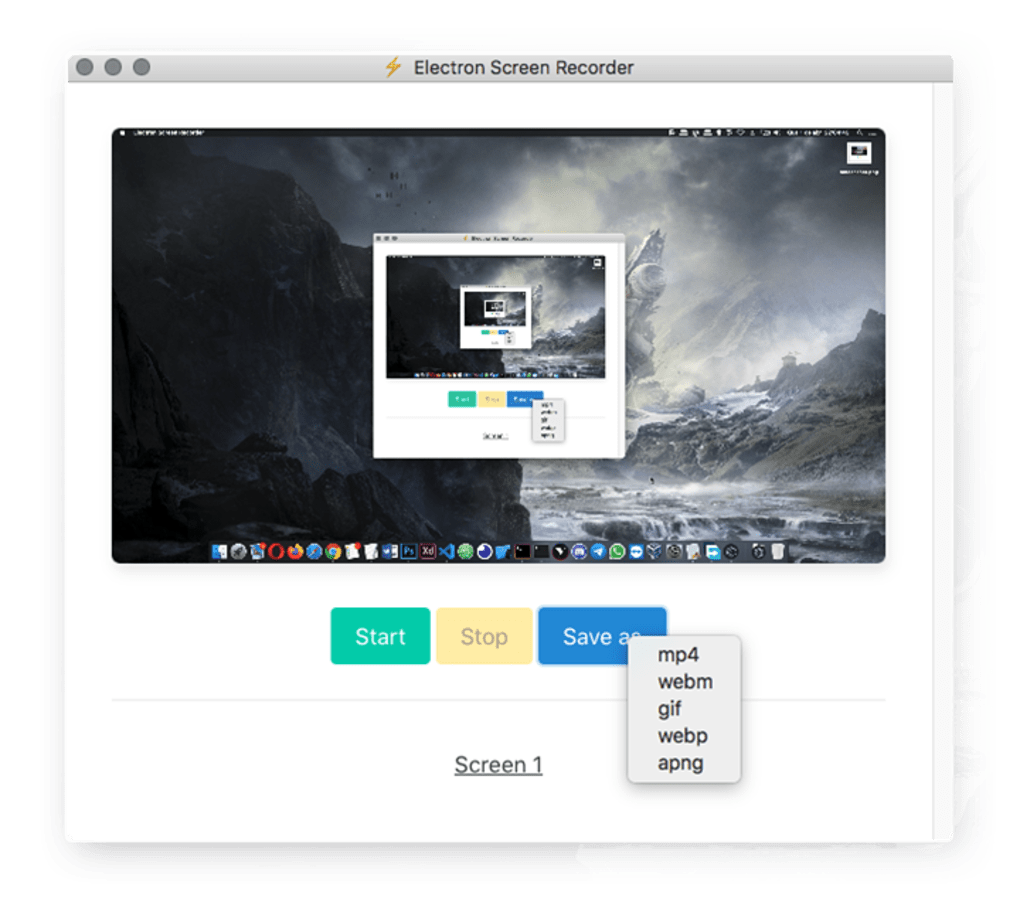
Built on the Electron framework, it runs smoothly across Windows, Mac, and Linux systems, making it a versatile choice for both casual and professional users. Whether you're creating quick tutorials, capturing gameplay, or recording online meetings, Electron Screen Recorder delivers reliable performance without the clutter. Its intuitive interface features only three core buttons—Start, Stop, and Save—ensuring there’s no learning curve.
Despite its minimal design, the app supports multiple output formats including MP4, WEBM, GIF, WEBP, and APNG, giving you flexibility in how you share or store your recordings. While it lacks advanced settings and hotkey support, its straightforward functionality makes it ideal for on-the-go screen captures. Best of all, it’s completely free to download and use—no subscriptions, no hidden fees.
Key Features of Electron Screen Recorder
Electron Screen Recorder stands out for its minimalist yet powerful approach to screen recording. Despite its simple interface, it offers a set of essential features that make it a reliable tool for everyday use. One of its standout features is the ability to record either your entire screen or a custom-selected portion of it. This flexibility is perfect for capturing specific windows, browser tabs, or application interfaces without including unnecessary background content. The recording process is initiated with a single click on the Start button, and you can stop it anytime using the Stop button—no complex workflows required.
Another major advantage is its support for multiple output formats. After recording, you can save your video in widely compatible formats such as MP4 (ideal for sharing), WEBM (great for web use), and GIF (perfect for short, looping clips). For more advanced users, formats like WEBP and APNG offer optimized image sequences with smaller file sizes. The app also runs efficiently on low-end systems due to its lightweight architecture, ensuring smooth performance even on older hardware.
Being open-source means the code is transparent and community-reviewed, enhancing security and trust. Users can download it from official repositories without worrying about malware or bundled software. Additionally, the app is updated regularly by its developer, ensuring compatibility with new OS versions and security patches. While it doesn’t offer advanced features like audio recording, editing tools, or scheduled recordings, it excels in its core purpose: fast, reliable screen capture with minimal setup.
- Record full screen or custom screen regions
- Supports MP4, WEBM, GIF, WEBP, and APNG output formats
- Open-source and free to download and use
- Lightweight and efficient performance across Windows, Mac, and Linux
- Simple, intuitive interface with no learning curve
- Regular updates and active community support
How to Install and Use Electron Screen Recorder
Installing Electron Screen Recorder is quick and hassle-free. Since it’s built with Electron, the app is distributed as a portable package, meaning you don’t need to go through a traditional installer. Here’s a step-by-step guide to get started:
- Download the App: Visit the official GitHub repository or trusted download site to get the latest version. Choose the correct file for your operating system—Windows (.exe), Mac (.dmg), or Linux (.AppImage or .deb).
- Extract the Files: Once downloaded, extract the archive to a folder of your choice. No installation is required—just double-click the app file to launch it.
- Launch the Application: Open the app. You’ll see a clean, minimal interface with three main buttons: Start, Stop, and Save.
- Select Your Recording Area: Click the “Select Area” button to choose the portion of your screen you want to record. You can drag to define a custom region or choose “Record It All” to capture your entire desktop.
- Start Recording: Click the Start button. The recording will begin immediately, and you’ll see a small overlay indicating that the screen is being captured.
- Stop and Save: When finished, click Stop. The app will prompt you to save the file. Choose your preferred format (MP4, GIF, etc.) and location.
Using Electron Screen Recorder is ideal for quick tasks. For example, if you’re troubleshooting a software issue and need to show a bug in action, you can record the problem in seconds. Similarly, educators can use it to create short video lessons without spending time on complex editing software. The entire process—from launch to saving—takes less than a minute, making it perfect for users who value efficiency.
Compatibility & System Requirements
One of the biggest strengths of Electron Screen Recorder is its cross-platform compatibility. It runs seamlessly on Windows 7 and later, macOS 10.13 (High Sierra) and above, and various Linux distributions including Ubuntu, Debian, and Fedora. This broad support makes it an excellent choice for users across different ecosystems.
The app is built using the Electron framework, which allows it to maintain consistent performance across platforms while leveraging native OS features like screen capture APIs. This ensures that recordings are smooth and stable, even during high-activity sessions like gaming or video conferencing.
System requirements are minimal. You don’t need a powerful GPU or high RAM to run it. A modern CPU with at least 2GB of RAM and a standard graphics card is sufficient. The app is designed to be lightweight, so it won’t consume excessive system resources during recording. This makes it suitable for older laptops, Chromebooks, or budget desktops.
Additionally, because it’s open-source, developers can contribute to its compatibility improvements. This community-driven development ensures that new OS updates and hardware changes are addressed promptly. Whether you're using a Windows 11 laptop, a MacBook Air, or a Linux-based workstation, Electron Screen Recorder delivers consistent performance.
- Windows 7 or later
- macOS 10.13 (High Sierra) or newer
- Linux (Ubuntu, Debian, Fedora, etc.)
- Minimum 2GB RAM, 2GHz CPU
- Compatible with Intel and AMD processors
- Supports 1080p and 4K screen resolutions
Pros and Cons: Is Electron Screen Recorder Right for You?
Like any tool, Electron Screen Recorder has its strengths and limitations. Understanding these can help you decide if it’s the right fit for your needs.
Pros
- Free and Open-Source: No cost, no ads, no tracking—perfect for privacy-conscious users.
- Lightweight and Fast: Minimal resource usage ensures smooth performance on older devices.
- Simple Interface: No complex menus—just start, stop, save. Ideal for beginners.
- Multiple Output Formats: Save recordings in MP4, GIF, WEBM, and more for versatile sharing.
- Cross-Platform Support: Works on Windows, Mac, and Linux without reinstallation.
Cons
- No Advanced Settings: No options for adjusting frame rate, bitrate, or resolution.
- No Hotkey Support: Cannot use keyboard shortcuts to start/stop recording.
- No Audio Recording: Only captures video—no microphone or system audio.
- Limited Customization: Cannot set default save locations or file naming rules.
- Basic Editing Tools: No built-in trimming, cropping, or watermarking.
Frequently Asked Questions (FAQ)
Conclusion: A No-Frills Screen Recorder for Quick Tasks
Electron Screen Recorder is a refreshing take on screen capture tools—simple, secure, and efficient. While it lacks advanced features like audio recording, hotkeys, or customizable settings, it excels in its core function: recording your screen with minimal effort. For users who need a quick, reliable solution for tutorials, bug reports, or short clips, this app is an excellent choice.
Its open-source nature ensures transparency and trust, while its lightweight design makes it accessible to a wide range of users. Whether you’re on a Windows PC, Mac, or Linux machine, you can download and use it instantly without installation hassles.
Ready to try it? Download Electron Screen Recorder today and experience fast, hassle-free screen recording—free, secure, and built for simplicity.







